


This is a submission for the Presage SmartSpectra SDK Challenge
What I Built
My laptop camera gave 10 frames per second. The SmartSpectra SDK needs 25. I found that out at night, under a fluorescent tube, with the generator on. The SDK's new Device Readiness check said "limited" before the session started. Without that check I would only have seen "no metrics".
That made me ask a simple question: when a camera gives me a pulse number, how do I know I can trust it on my own setup?
Wrist vs Camera answers that question for one person, one camera and one room:
- Will it work here? It runs Device Readiness first and shows the live frame rate.
- Does the camera agree with my wrist? You put two fingers on your wrist and count for 60 seconds. The app compares your count with the camera's median for the same 60 seconds. Within ±5 bpm is "agree". I fixed that rule before my first test.
- What leaves my computer? A live upload meter compares the bytes your computer sends during the session with 20 seconds of idle time.
On a good night it says "ready" and the reading holds for minutes. On a bad afternoon it says "limited", and it is right. The video shows both.
Why I built it
Two things happened during my tests.
- My laptop camera failed in my everyday setup: a fluorescent tube at night, with generator power. It gave 10 frames per second, and in daylight it still gave 10. Apps that work with camera sensors should detect these conditions and warn the user. Otherwise, users may be misled by whatever the sensor puts out.
- A second observation was that a real comparison would be needed. A pharmacist counted my pulse by hand: 180 before my test and 130 after. Those two numbers are 50 bpm apart, so I could not use them. A reference is only useful if you can trust it too. So I counted my own pulse for 60 seconds, twice, and compared. That became the core of the app: a check anyone can do with two fingers and a clock.
My professional background is geophysics. There is a saying in the field: geology always governs your geophysics. A resistivity reading is only a model until checked against the real ground, for example, a borehole log. A camera pulse reading is the same. My wrist count is the borehole.
Demo
The first 42 seconds are the live app on my laptop (Nov 22, night): Device Readiness "ready", my camera picture, a live pulse with the stable flag, and the result. The rest is a narrated replay of a real session from Nov 20. I blurred my face in the camera preview because the video is public. The app itself never saves or uploads images.
Try it in one minute, no install: https://dannwaneri.github.io/wrist-vs-camera/?replay
It plays saved numbers from a real session and says "Recorded session, not live" at the top. Live measuring runs on your own computer (see Code).

The Result screen says what happened, not only the numbers.
Code
 dannwaneri
/
wrist-vs-camera
Count your own pulse against a camera pulse reading (Presage SmartSpectra SDK), with Device Readiness and a live upload meter.
Wrist vs Camera
Count your own pulse on your wrist. See if the camera agrees. See what leaves your computer.
Built for the DEV Presage SmartSpectra SDK Challenge with @smartspectra/node-sdk 3.5.0.
Demo video (2:51)
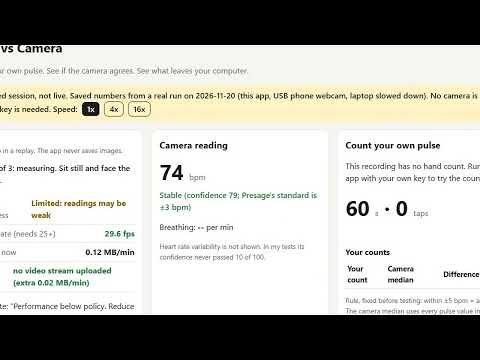
The first 42 seconds are the live app on my laptop (Nov 22, night): Device Readiness "ready", my camera picture, a live pulse with the stable flag, and the result. The rest is a narrated replay of a real session from Nov 20. I blurred my face in the camera preview because the video is public. The app itself never saves or uploads images.
How to test
1 minute, no install, no key: open https://dannwaneri.github.io/wrist-vs-camera/?replay It plays saved numbers from a real session, labelled "Recorded session, not live". Use the 16x button to see the whole session in about 20 seconds.
Measure yourself (about 5 minutes). You need Node.js 20+, a free Presage key, and a…
Setup takes four commands (git clone, cd, npm install, npm start). The README starts with "How to test". You need Node.js 20+ and a free Presage key. MIT license.
How It Responds to Human Signals
The app gets heart rate data and breathing data from @smartspectra/node-sdk 3.5.0. Each heart rate value also comes with an SDK stable flag. The SDK documentation says stable means confidence 40 or more, which is their ±3 bpm standard.
- Device Readiness (
checkDeviceReadiness(), new in 3.5.0) runs before the camera session and gives ready, limited, blocked or inconclusive. - Validation status hints from the SDK, such as "No face found", "Place more of the chest in view" and "Use a camera mode that provides at least 25 frames per second", show live under the preview.
- Your own pulse count is the second signal, and the app puts it next to the camera's number.
How I integrated the SDK
The SDK runs in a small Node.js server on 127.0.0.1. I did not use the browser-side API, because checkDeviceReadiness() exists only in the native part. The server sends each event to the browser page with server-sent events.
const sdk = new SmartSpectraSDK({
  apiKey: readKey(),                        // from a local file, never sent to the page
  requestedMetrics: [...breathingMetrics, ...cardioMetrics.filter(m => m !== MetricType.HRV)],
  enableTelemetry: false,
});
sdk.useCamera(CameraSelection.byId(cam.id), { width: 1280, height: 720 });
const readiness = await sdk.checkDeviceReadiness();   // ready | limited | blocked | inconclusive
if (readiness.verdict === 'blocked') return stopSession('blocked by Device Readiness');
sdk.start();
How the page responds in real time:
-
metrics: the pulse number updates, with "Stable (confidence N)" in green or "Not stable: low confidence, ignore this value" in yellow. -
validationStatus: the SDK's hint shows under the preview. The SDK sends it on every frame, so the server passes on only the changes. -
frameSentThrough: the frame rate turns red below 25. If no frame arrives for 8 seconds, the app stops and says the camera was lost. -
error: the SDK's message shows on the page. A non-retryable error stops the session. - During your 60 s count, the app collects every camera pulse value. At the end, it puts your number next to their median and applies the ±5 rule.
Heart rate variability is not in the app. I tested it, but it never appeared over Phone Link (0 of 5,231 data packets). Over USB it appeared, but its confidence never went above 10 of 100 and no value was marked stable.

Nov 20. Device Readiness says "limited". The frame rate is still 30, and the pulse is stable.

About a minute later. The laptop slowed down to 16.4 fps, and the SDK stopped. Device Readiness had warned about this.
What I measured (one person, at home in Nigeria, November 2026)
| Test | Result |
|---|---|
| Laptop webcam, night, fluorescent light, generator | 10 fps. Readiness "limited". No vitals |
| Laptop webcam, daylight | Still 10 fps. ffmpeg also gets 10 fps, so it is the camera, not the SDK |
| Pixel 6 Pro via Phone Link | 30 fps. Pulse and breathing work. No HRV |
| Pixel 6 Pro as USB webcam | 30 fps. HRV appears, confidence never above 10 of 100 |
| Extra upload during sessions (6 sessions) | 0 to 0.3 MB/min. My rule: under 1 MB/min means no video stream is uploaded |
| Camera vs my hand count (300 s run) | Camera median 74.4. My counts 70 before, 65 after (counted before and after the run, not during it). 6.9 bpm apart. Fails my ±5 rule |
| Camera vs tapping each beat (in the app) | My taps 53, camera 79.2. Disagree. Only 7 of 32 camera values were stable while I tapped |
| Camera vs counting in my head (in the app, Nov 18) | I counted 63. Not compared: a bug in my code crashed the app before it saved the count. Fixed |
| Five more tries in the app (Nov 20, afternoon, USB webcam) | Device Readiness said "limited" all 5 times ("reduce the requested workload or contention"). It was right: in the 3 sessions that ran, the frame rate fell from 30 to 15-20 after 25-65 s, and the SDK stopped. No 60 s count could finish. Pulse while fps was 30: median 74.5, 69% stable. Upload extra 0.07 MB/min |
| One more session (Nov 22, night, charger in, app no longer requests HRV) | Device Readiness "ready". 30 fps for the whole 3 minutes. Pulse median 74.4, 80% stable. Upload extra 0.07 MB/min. No count. I changed several things at once, so I do not know which one helped |
The tapping result changed the app. When I pressed a key on every beat, I moved, and the camera lost quality. I also missed beats. So the default is now to count in your head, keep still, and type the number at the end. Tapping is still an option.
Every run, including the failed ones, is in results/runs.csv in the repo.
Prize Categories
Best Thoughtful Real-World Use.
I built and tested it in the conditions I live with: a 10 fps laptop webcam, a fluorescent tube at night, generator power, and a laptop that slowed down in the afternoon. The need: a camera pulse reading looks the same whether the setup is good or bad. This app tells people when their setup can't measure, and gives them a way to check the number with their own wrist. It shows my own fails instead of hiding them.
Who it is for: one person who wants to use camera vitals on the laptop or phone camera they already have, with no partner and no extra device. It is also for developers who build with SmartSpectra and want to see how the SDK behaves on a real, ordinary setup.
How I made it usable:
- No install to look at it: the replay link plays a real session in the browser, with no camera and no key.
- Plain words: "Ready", "Limited: readings may be weak", "Stable" or "Not stable: low confidence, ignore this value", and one large result line at the end.
- The count is easy: count in your head, keep still, type one number. My first version asked for a tap on every beat, and my own test showed that it made me move.
- Clear exits: one Stop button, and one button that deletes the saved key.
Consent and Data Handling
The camera starts only when you press "Check and start", and stops when you press Stop or close the PowerShell window that runs the app. Closing only the browser tab does not stop the camera, so press Stop first. Processing is on your computer, and SDK telemetry is off (enableTelemetry: false).
The SDK checks the API key and reports usage. My measurement found no video upload: 0 to 0.3 MB/min extra, which is at most about 40 kbit/s. Your vital numbers also go to Presage. Presage's LLM Insights page says the SDK "automatically dispatches vitals snapshots" (pulse rate, HRV and breathing rate) during a session: one at the first stable reading of each, then one every 60 seconds. The same page says raw video and face images are never sent. This app does not request HRV, so only pulse and breathing are measured. I found no setting to turn the snapshots off. My upload meter cannot see something this small. I learned about it from Feltbeat, which logged these events.
The app stores your key in a local file, and one button deletes it. It saves a session record with numbers only, no images, in the sessions folder on your computer. "Save results" downloads a copy. Records stay until you delete the files in that folder. Nothing is shared by the app, and there is no account. The preview is a small image sent from the local server to your own browser tab on 127.0.0.1. The server accepts only local requests.
Not a medical device. It does not diagnose or treat anything.
Limits
One person tested it, with one skin tone, one phone and one laptop. A hand count is a rough reference, and a missed beat changes it. The upload meter counts all traffic from the computer, so other apps can push it up. The USB webcam link dropped a few times during my tests. The app detects this and stops the session. The macOS and Linux upload meters are written but not tested.
What's next
More people. One person with one skin tone is not enough, so the next step is the same count test with other people, other skin tones and other cameras. A better reference would help too: a finger pulse oximeter shows the pulse directly and would remove the counting errors from the comparison. I also want more than one count per session. Several 60-second counts in one session would show if the gap is steady or random.
The USB link needs more testing. It dropped 3 times when the app opened the camera again, 20 seconds after Device Readiness. I changed the order so the session starts right after the check. In the 2 sessions after that change, it did not drop. Two sessions are not proof.
Test on macOS and Linux. The code is written for both, but I only tested it on Windows 11.
What I would tell Presage
Device Readiness works. My laptop camera gave 10 fps in all light, and the SDK log said its driver has no exposure lock. On the night of my first test, Device Readiness said "limited" before every session. It told me the problem before I wasted a session. On Nov 20 it said "limited" 5 of 5 times with a phone camera that gives 30 fps. In the 3 sessions that ran, the laptop slowed down within about a minute and the SDK stopped. On Nov 22, at night, with the charger in, it said "ready", and the session kept 30 fps for 3 minutes.
I wanted Device Readiness on the browser side too. The SDK's browser-side API (useMediaStream) has no checkDeviceReadiness(). It is only in the native part, so my app needs a local Node server. A browser version would make this check easy to add to any web app.
Give users a way to check the number. A "count your own pulse for 60 seconds" step costs nothing to build. It lets a user see if the camera works for them, on their camera, in their room. Presage could put it in its own demo apps.
Sources
Presage SmartSpectra SDK for Node.js (npm package @smartspectra/node-sdk), version 3.5.0:
- README
- Device Readiness guide (
docs/device-readiness.md) - Definitions of the messages, showing that a pulse value marked stable has confidence 40 or more, which Presage maps to its ±3 bpm standard
Presage HRV model card: https://vandv.presagetech.com/hrv_model_card.html. It says HRV needs 60 seconds of face view at 25+ fps and that locking the camera's exposure, gain and white balance is "critical" for HRV accuracy.
Presage arterial pressure model card (linked from the SDK for the pulse confidence mapping): https://vandv.presagetech.com/arterial_pressure_model_card.html
My own test data: results/runs.csv, results/README.md and results/app-sessions/ in the repo.


Top comments (1)
Checking the camera against the wrist on your own setup, before trusting the number, is exactly the right instinct. A pulse reading is only as good as the conditions it was taken in, and the readiness check saying "limited" up front is far more honest than a silent wrong number.