

Coding without a code editor or IDE is unimaginable unless you use notepad. So, what's you current editor/IDE setup, you can share your editor/IDE,...
For further actions, you may consider blocking this person and/or reporting abuse


Displaying a subset of the total comments. Please sign in to view all comments on this post.
Here's mine:
Editor: VS Code
Terminal: Default Windows Terminal
Theme: Kimble Dark
Font: Cascadia Code
Icon Theme: File Icons
Some extensions: GlassIt-VSC, Auto Close Tag, Better C++ Syntax, Color Highlight, Prettier
I just love your vs code setup, will definitely try out the theme :)
Oooh cool theme!
Nice Theme! Which bracket extension did you use (the one that displays the green line)?
VS Code has built-in bracket colorization and highlighting :)
Big fan of Neovim here!
wow amazing.... where did you get guide to setup like this???
I don't have a guide but I'm creating a post to share this setup.
my VIM is identical to yours, but my OS is Manjaro (Linux) with i3 tiling window manager and the terminal is ST (suckless terminal)
This was my setup until a few weeks ago when I swapped themes and fonts. Well my terminal is different as I am on ubuntu but pretty close.
i'm going to be that "vim guy" and that "the os is the ide guy" and say:
"os is the ide guy" so true 😂, I occasionally use lunar vim sometimes and I have tried gruvbox on vscode, it was my color theme for around 1 month, one of the coolest themes ♥
Pop!_OSorUbuntuTilixoh-my-zshNeoVim+SpaceVimmolokai,badwolf, orjellybeansNerdFont mono 13Feel free to grab my Spacevim.d configuration, if you like it.
might try out the theme, looks great
I like the nanotech/jellybeans theme a lot, too.
Github Copilot is pretty cool as well. Also, Tailwind Intellisense +
prettier-plugin-tailwindcssprevent a lot of hassle (the latter is not a VSCode extension tho).there are a lot of sites where you can learn more about vim, I haven't configured mine as I rarely use it, but I use LunarVim which already comes with some cool features, and ben awad made a video which you might want to see:
youtube.com/watch?v=gnupOrSEikQ
Hi marcusdiedrich,
You might have a look at SpaceVim, which provides a nicely customized set of Vim plugins to be a full-featured IDE. I've used Vim as my primary editor for 20-some years, and switched to NeoVim + SpaceVim about a year and a half ago, and I really enjoy using it. You don't have to use SpaceVim with NeoVim, but I've found they're a very good combination. I've customized my SpaceVim configuration to look just how I like it. I'd be curious to know if you try it and how you like it.
yo man! I've been using your recommendation SpaceVim and wow have I got to say I am super impressed!! This is definitely the best setup for vim especially when it comes to things like customization, syntax highlighting, and having a file tree or plugin manager all within vim and easy to setup. Honestly now that I've got it all configured I doubt I'll even consider switching to anything else. so thank you for the tip. 🔥
Awesome! Really glad you found it useful. I occasionally still use Vim in other configurations, but generally only if I just need a text editor for a quick task. Once I got used to SpaceVim, I haven't really looked back. Especially as I'm often working via an SSH session and latency just isn't an issue as it can be with some other IDEs.
looks great! going to take your advice and setup a similar config with Neovim/Spacevim. thanks for the tip ill let you know how it goes.
what prompt are you using for hyper, that looks so good 👀
Im using pure prompt, thanks!
thanks!
Can I install kitty terminal on windows?
Yes. Via wsl
Too many VSCode 😂.
Editor: WebStorm (+ VSCode [without sidebar, only shortcuts 😛] for small edit)
Terminal: iTerm with fish + fisher (git plugin, nvm)
Theme: One Dark
Font: Monolisa or JetBrains Mono
Extensions: Tailwind intellisense, copilot for VSCode)
😂people like vs code
Waiting someone mention JetBrain products
😂
I've used VS Code a lot previously with a custom Rose Pine theme and quite a few extensions but when I work on multiple windows it slows down a lot, especially with TS. Sublime is such a nicer and smoother experience. I still use VS Code but just when I need to do Live Share coding, for all other purposes Sublime is my preferred choice.
looks great
thanks man! I like to keep things simple so not to much going on there.
minimalism is cool 🤝
Background: I use macOS.
The M+ font is indispensable for me. It is a very well made free Japanese font. I require that Japanese text in my code perfectly line up with alphabet which M+ is good at but some preinstalled macOS fonts fail to do so!
I like this discussion! It might seem trivial, but it made me check and appreciate the various beautiful fonts that I use besides web font and graphic typography! I also appreciate many of the other recommendations in the post and comments, including Sarah Drasner's Night Owl Theme which I used regularly when VS Code (or rather Codium) was my default code editor. Currently I prefer PhpStorm as a good IDE for fullstack frontend and backend coding.
Here is a screenshot collage of PhpStorm with my three favourite themes (I prefer to switch light and dark themes depending on the surrounding light), Sakura terminal, and the Ubuntu Budgie launcher which brings some MacBook look and feel to Ubuntu Linux:
glad that you liked the discussion, I was able to find out about a lot of new themes, extensions, fonts, and even editors from this whole discussion, so it was definitely a good idea asking the question :)
I love your aesthetic setup, the color scheme, fonts, even the ide and terminal they're complementing each other well ❤
Editor: VS Code
Terminal: powershell (on windows), ZSH on Mac
Theme: VS Code default Dark
Font: Consolas
Icon Theme: Default
Some extensions I really like: ESLint, Prettier, Bracket Pair Colorizer 2 (which is deprecated :( ), VSCode-Pets
This is because vscode has his own bracket pair colorizer. ;)
Editor: VS Code
Terminal: Hyper/iTerm 2
Theme: Dracula
Font: Jetbrains Mono
Icon Theme: Material Icon Theme
Some extensions I really like: Thunder Client, Colorize, Better Comments
Dracula is one of my most used themes :)
I put Dracula everywhere all my IDE's and terminals have the same theme.
Some extensions I really like: lunarvim.org/plugins/01-core-plugi...
Editor: VS code / Pycharm (dark theme)
Terminal: Bash terminal
Theme: Default Dark
Icon Theme: Material Theme Icons
Font: monospace
Some extensions I really like : Docker,Remote SSH,GitLens,Markdown
Editor: VSCODE
Terminal: Iterm and ZSH (Mac OS)
Theme: Monokai Pro
Font: Cascadia
Icon Theme: Material Icon Theme
Some extensions I really like: GitLens , Thunder Client, Code time
Editor: VSCode for web dev, and PyCharm for python
Terminal: Konsole (KDE Default) with OhMyZsh and Powerline
Theme: VSCode Dark+
Font: Caskaydia Cove Nerd Font for the editor + Hack Nerd Font for the terminal
Icon Theme: Material Icon Theme
Some extensions I really like: GitHub Copilot, Better Comments, SQL
i use arch btw
Editor : VS Code (& IntelliJ 😶)
Terminal : HyperJS with OhMyZsh
Theme : Cobalt 2
Font : Incosolata
Icon Theme : Material Icon Theme for sure
Some extensions I REALLY like : AutoImport, Auto Rename Tag, Color Highlight & obvs prettier.
Which Editor i use depends on the use case. I dont have a one fits All solution, rather have the most comfortable setup for developing in the given Environment.
Java, Android native
C, c#, c++
Js, ts, groovy, xslt, HTML, futter, react, bla
XML, json undefined data
Mariadb, MySQL, mssql
well organized setup
Editor: VS Code
Terminal: Warp
Theme: GitHub Light for daytime use, GitHub Dark for nighttime use
Font: Fira Code w/ Ligatures
Icon Theme: Material Icon Theme
Some extensions I really like: Error lens, TODO Tree, Vim
I want to use warp so bad 😭
Editor: VS Codium
Terminal: Konsole with bash
Theme: Codel (though I like light themes better..
Font: Droid Sans Mono
Icon Theme: Icy Icons
Some extensions I really like: Error Lens, Markdown all-in-one, Marko VSCode and, recently discovered, Marquee. :D
Editor/IDE: JetBrains WebStorm / IntellIJ
Terminal: Cmder (windows)
Theme: Material Darker (IDE), monokai (terminal)
Font: Inconsolata
Icon Theme: Atom Material Icons
Some extensions I really like: Tabnine, String manipulation, Rainbow brackets, Code Time, JSON Helper
I edit with (g)vim on Ubuntu Linux.
My vim configuration (github.com/juanlanus/vimconfig) renders a screen of almost only lines of code, no space wasted in clickacle artifacts.
The fonts are "Source Code Pro Medium" and the beautifun "Montserrat" for proportional spacing.
I use mainly BitBucket (instead of GitHub) because it allows me to have private repos for free. I interact with the remote repos using plain command line Git.
GNOME Terminal, the Ubuntu default.
Actually, I'm old and I use vi, later vim, since like 40 years ago, in SCO Unix and later in Windows 98 (it was a 70K exe).
To me, vim is the most productive tool, the one with highest usability, because is allows me to do more work with less keystrokes more safely.
I don't confuse usability with ease to learn. To be proficient with vim you need some training, and then some more. But it gets the job done quickly; for example I seldom take my hands out of the keyboard to grab the mouse.
the last few lines are so true
Editor: Intellij Idea
Terminal: iTerm + ZSH + Oh my ZSH
Theme: Foundation dark
Font: PragmataPro. It looks sick! fsd.it/shop/fonts/pragmatapro/
Extensions:
hide path, git toolbox, GitHub Copilot (I'm afraid of that thing. It does wonders), Nyan Cat Progress Bar (installed it for fun, still using it 6 years later), plugins for string and different files manipulation (csv, json, yaml, properties, etc).
I just checked the nyan cat extension, already loving it 😂
Editor: VS Code
Terminal: iTerm with OMZ
Theme: Eclipse Color Theme
Font: Liga Menlo
Icon Theme: macOS classic icon them
Some extensions I really like: error lens, gitlense, auto align, eclipse color theme and keymaps
I've got a pretty heavily customized setup...
Hardware: MacBook Pro 7,11
OS: Arch Linux
Window Manager: xfce4 (with customized Dots theme)
GTK Theme: Customized Ultimate Dark
Icons: Ghost Flat
Dock: plank
Terminal: guake
Editor: xed (with oblivion theme)
System Font: Roboto
Editor Font: Source Code Pro
I have a pretty regular setup. But one thing I just noticed is the fact I am having like 5 editors installed. Although I only use VS Code I got sublime, android studio, PyCharm and IntelliJ. 🤷♂️ Time to regain some disk space.
damn, 5 editors on one machine, the most editors I have ever used together is 2 😆
Editor: Rider
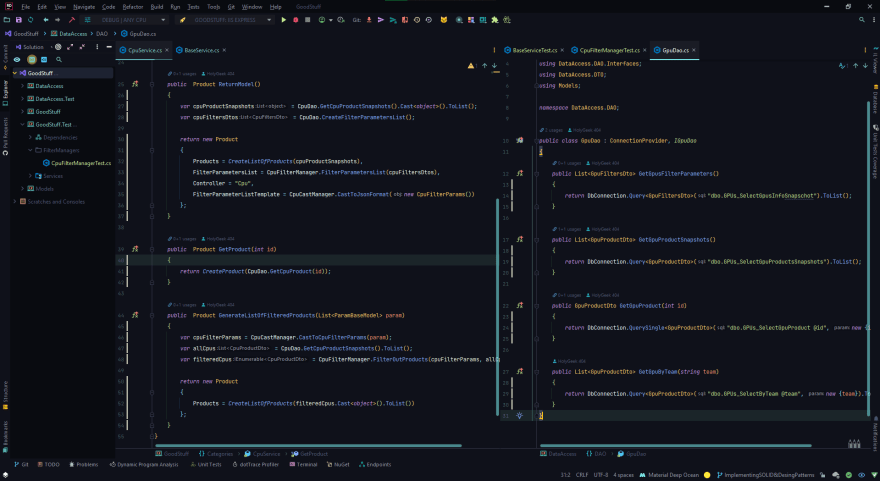
Theme: Material Deep Ocean
Font: Menlo
Icon Theme: Atom Material Icon
Extensions: Kite AI, Rainbow Brackets
Editor: VS Code
Terminal: Window Terminal & In Vscode : Powershell
Theme: dracula ( dont know much theme )
Font: Cascadia Code
Icon Theme: vscode icon pack extension
extensions I like: GitHub Copilot ( do many task == time save 😂 ), every language intellisense, git lens, prettier, etc
Editor: Neovim.
Terminal: Alacritty and oh-my-bash.
Theme: Dracula for terminal, TokyoNight for Neovim.
Font: Hack font.
Extensions: A bunch of plugins in neovim like LSP, Treesitter...
OS: Arch Linux.
Editor: VS Code
Terminal:Default terminal for linux
Theme: Witcher
Font: Ubuntu Mono
Icon Theme: Material Icon Theme
Some extensions I really like: Auto Close Tag, Auto Rename Tag, Better Comments, error lens,ES7.
Why not?
Editor: Emacs w/ Evil Mode
Theme: Monokai w/ modifications
Terminal: Guake
Guake for life! 👌🏻
Editor: VS Code
Terminal: typically I use VS Code's integrated terminal, but I also use iTerm, both with Fig and zshrc. I've recently been trying out warp.dev as well
Theme: Fortnite with Legendary mode enabled
Font: Dank Mono
Icon Theme: File Icons (colorless)
Some extensions I really like: Live Share extension pack, prettier, Auto Rename Tag
More on my setup at iamdeveloper.com/uses
I want to try out warp too, but they don't support windows yet, so gotta be patient :'(
I really liked the idea of having a setup section on personal site, don't mind me stealing the idea and implementing it in my site, tysm! 😆
Editor: VSCode w/ Vim emulation
Terminal: Windows Terminal w/ PowerShell
Theme: Monokai Pro
Font: JetBrains Mono
Icon Theme: Monokai Pro icons
Some extensions I really like: Multiple cursor case preserve, prettier, GitLens, ESLint, and some more.
Editor: VS Code
Terminal: Windows Terminal with WSL2
Integrated Terminal: Bash with Starship and ble.sh
Integrated Terminal Font: FiraCode Nerd Font Mono
Theme: GitHub Theme (GitHub Dark Default)
Editor Font: JetBrains Mono
Icon Theme: Material Icon Theme
Some extensions I really like: GitHub Copilot, ESLint, Prettier, Thunder Client, Path Intellisense
I use the auto rename tag too, it's a life saver lol
VScode, with starship as the terminal
I use the
Material Dark theme with material icons. For the terminal I use Jetbrains Mono as font and ofc GitHub copilot
I use starship with powershell 7, one of the best prompts out there 💪
Editor: Neovim
Terminal: Alacritty
Theme: OneDark
Font: Jetbrains mono (recently migrated from Inconsolata, both great choices)
On my customized arch system, it brings joy to work on it.
IDE: Intelliji (RubyMine)
Iterm2 + ZSH
Font/Theme: default
tried the theme, the color scheme is well chosen and actually resembles catppuccin a lot, the only thing that's an issue for me is that some colors are high contrast and I personally prefer softer colors which don't strain the eyes much, overall the theme looks good ❤
Editor: VS 2022
Terminal: PowerShell 7 (Windows Terminal) with oh my posh
Theme: Dark
Font: CaskaydiaCove NF
Icon Theme: PS
Some extensions I really like: Csv converters, gitlense, FormatOnSave, PPT and more
here is mine
Editor: VS Code
Terminal: Terminator with Zsh, and ohmyzsh on Arch Linux (BTW)
Theme: Night Owl
Font: Droid Sans Mono
Icon Theme: Material Icon Theme
Some extensions: Autoprefixer, Live Server, Prettier - Code formatter, Vetur,...
night owl 🤝
Editor: Neovim (and tmux for window management)
Terminal: Alacritty
Theme: Deus (almost same as ayu)
Font: FiraCode
dev-to-uploads.s3.amazonaws.com/up...
Editor: VS Code
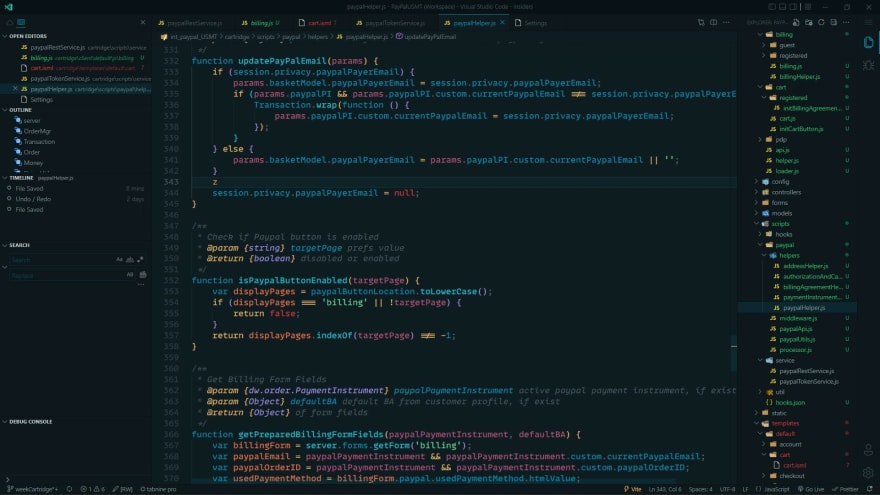
Theme: Bearded Theme(ALtica)
Font: MonoLisa Medium
Icon Theme: VS code icons
Some extensions I really want to be enabled always : Tabnine AI, GitLens, Output Colorizer, Prettier,Read-Only Indicator, Trailing Spaces
looks great!
Jetbrains IDEs in distraction-free mode with IdeaVim plugin.
Editor - Android Studio, Intellij IDEA
Text Editor - Sublime Text
Theme - Github Dark (Material)
Font - Seoge UI
Icon Pack - Material Icon Pack
Editor: VS Code
Terminal: VS CODE Terminal with PowerShell 7, Windows Terminal
Theme: One Dark Pro (The Best 😎👍)
Font: Fira Code
Icon Theme: Material Icon Theme
Some extensions I really like: MisterJ.angular-extension-pack-by-bro-jenuel, MisterJ.vue-volar-extention-pack, MisterJ.vue-extention-pack-by-bro-jenuel, MisterJ.laravel-expack
one dark is indeed one of the best dark themes out there, I have used fira code too :)
awesome mate 👍
Editor: VS Code
Theme:Dracula
VS code with default settings.
Yes I tried midnight from v2 as I like darker background 😅